Everything the ramp needs to know, in one glance.
GroundKit turns airport weather, NOTAMs and live traffic into a ramp status, arrival and departure boards, a turnaround checklist and a shift companion. Large type, glove-sized buttons and status you can read in full sun.
- · iPhone and iPad
- Android · 8.0 or later
- App Store and Google Play: coming soon
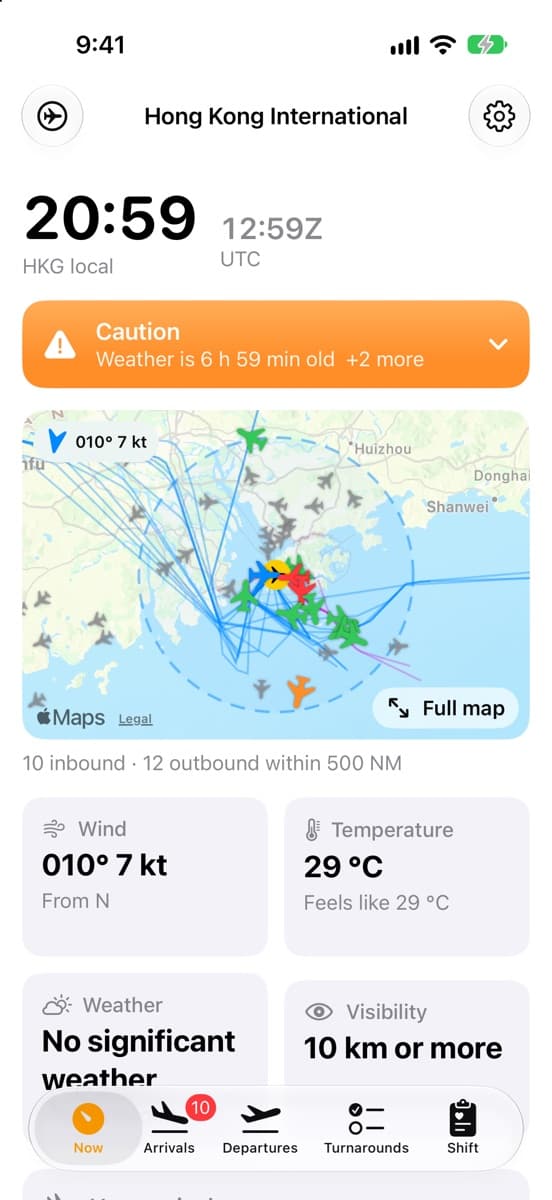
See today's conditions at your airport.
The web dashboard runs on the same data as the apps. GroundKit for iOS and Android is coming to the App Store and Google Play.
GroundKit is advisory. Ramp closures, lightning alerts and wind limits are the airport's and airline's call, and local procedures always take precedence. Wellbeing figures are guidance, not medical advice.
Ramp status
One answer before you walk out the door.
GroundKit reads the latest METAR, TAF and NOTAMs for your airport and boils them down to one status, with the reasons a tap away.
- Normal ops
Nothing in the weather or NOTAMs that limits ramp work.
- Caution
Gusts near your limits, heat stress, stale weather.
- Warning
Thunderstorms nearby, ice, gusts over your limits.
Features
Built around a turnaround, not a desk.
Six tools that cover a shift on the apron, from the first look at the weather to the handover note for the next crew.
- iOSAndroid
Ramp status at a glance
Normal ops, Caution or Warning from the latest METAR, TAF and NOTAMs: thunderstorms and lightning risk, wind and gust limits, ice, heat stress, wind chill, low visibility, runway closures and apron or taxiway notices.
- iOSAndroid
Arrivals and departures
Inbound aircraft with ETA, minutes to landing and distance, what is on the ground, and what is expected in the next 6 hours, each marked on time, late or very late. Freighters are tagged.
- iOSAndroid
Live airspace map
Aircraft within 500 NM pointing along their track and coloured by delay, the observed arrival and departure paths of the last 3 days, the 50 NM terminal area and the wind.
- iOS
Turnaround checklist
Chocks, cones, GPU, holds, bags and cargo, fuelling, catering, cleaning, NOTOC, loadsheet and pushback. One tap stamps the time, with bag and ULD counters and a countdown to off-block.
- iOSAndroid
Airport layout and routes
Runways, taxiways, stands, gates, aprons and cargo buildings from OpenStreetMap, with your position. Search for a stand or gate and get a route there along the service roads.
- iOSAndroid
Shift and wellbeing
Time on shift and breaks, water against a target that rises with the heat, fatigue checks from your sleep and hours, heat-strain warnings from heart rate, noise exposure on Apple Watch, and handover notes.
On iPhone
Real data, real airport.
Screenshots from the iPhone app at Hong Kong International, on live data.
Now
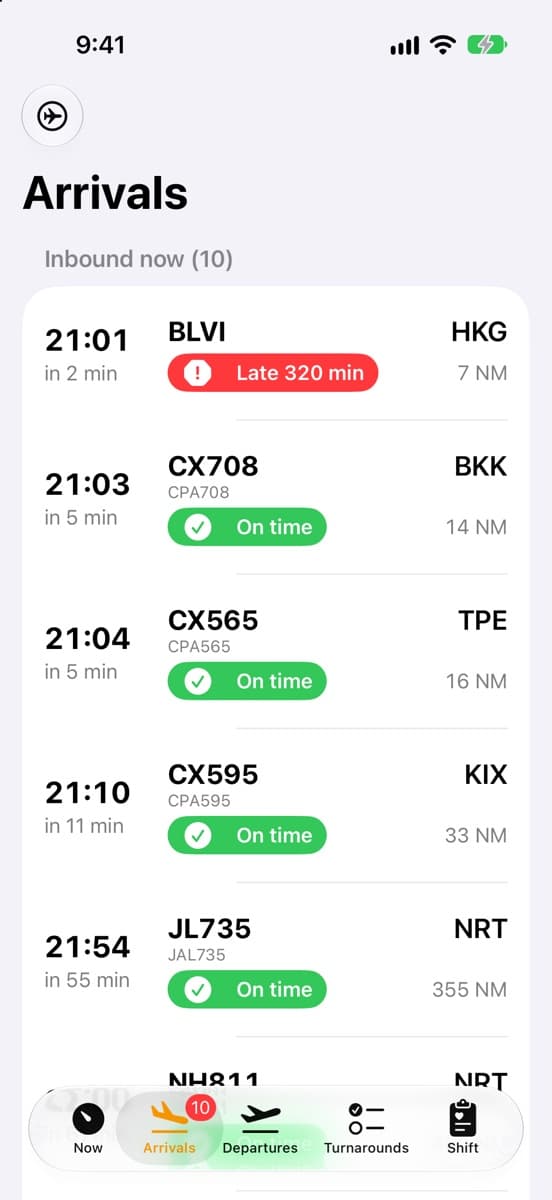
Arrivals
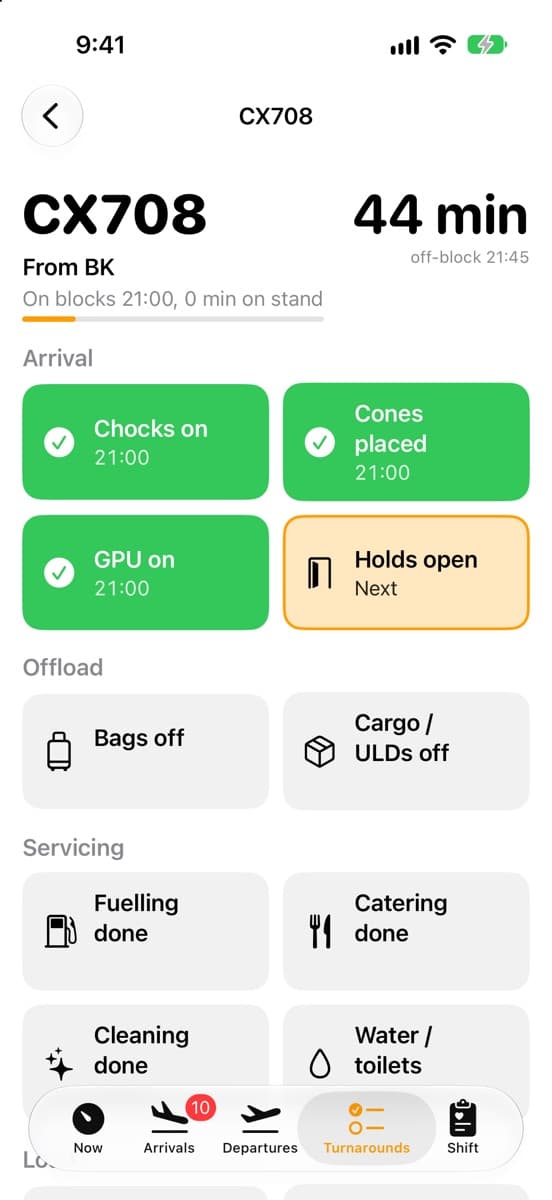
Turnarounds
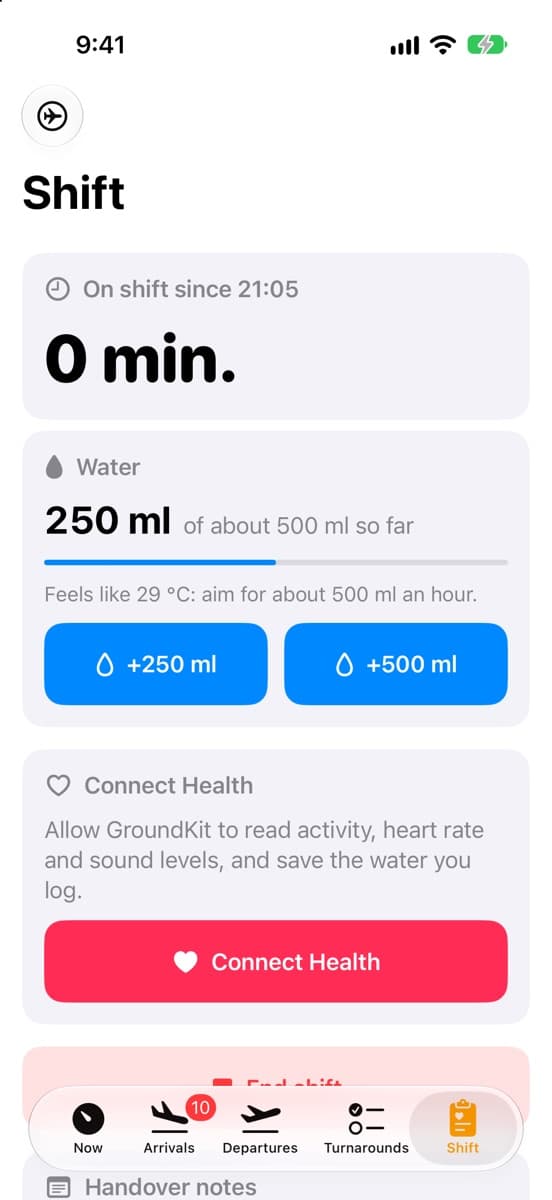
Shift
Built for outside
Readable in glare, rain and gloves.
Designed for the apron first: big targets, plain words and nothing that depends on colour alone.
- Built for gloves
- Large type and touch targets throughout. Glove mode on iPhone makes them larger still.
- Not colour alone
- Every status is a symbol, a word and a colour, so it reads in glare and for colour-blind crew.
- Hi-vis themes
- High-contrast light and dark themes, and Sunset mode, which goes dark at the airport's sunset so a night shift needs no fiddling.
- Works in dead spots
- The last data is kept on the device, so the app opens with it and says how old it is.
- Keep screen on
- For a tablet in a tug, on a belt loader or in the ops room.
- Your limits
- Set wind limits to match your airline's door, stairs, high-loader and jet bridge procedures.
Airports
Seven airports today.
Weather, NOTAMs and traffic are collected for each of these. Notices for the Australian airports are not yet included.
SYD
Sydney
Australia
MEL
Melbourne
Australia
BNE
Brisbane
Australia
SIN
Singapore Changi
Singapore
HKG
Hong Kong
Hong Kong
AMS
Amsterdam Schiphol
Netherlands
ANC
Anchorage
United States
How it works
Open data, one warehouse, two apps.
The same data platform feeds the iOS app, the Android app and the web dashboard, so they agree on every board.
- 01
Collect
METAR and TAF weather, NOTAMs, and ADS-B positions from OpenSky and adsb.lol, gathered on a schedule.
- 02
Model
Loaded into a MotherDuck warehouse and shaped with dbt, keeping 30 days of history for each airport.
- 03
Serve
A small API on Vercel hands each airport's snapshot and the live traffic around it to the apps, cached at the edge.
- 04
Predict
Where an airport publishes no flight board, each flight's usual time comes from its last 30 days, and delay is the live estimate against it.
Health data never leaves your phone or your own iCloud. Read the privacy policy.